


 346-200-6097
Why "The Anatomy of Data" Matters
When attorneys, investigators, or analysts discuss digital evidence, they often refer to "the data" or "evidence on a device" without fully understanding what these terms technically mean. This gap between everyday language and technical reality creates challenges in legal proceedings, expert testimony, and forensic analysis.
What is data, exactly? What does it look like beneath the surface of files, folders, and applications? How do the ones and zeros stored on a hard drive transform into the documents, images, and communications we analyze as evidence?
This guide walks step-by-step through the architecture of digital information: from bits and bytes (the smallest building blocks, with detailed explanations), through files and file systems, to higher-level artifacts (viewed only at a high level). The goal is to establish a shared technical foundation that supports both forensic practitioners and attorneys who must interpret and present digital evidence.
Understanding these fundamentals matters because digital forensics operates at the intersection of technology and law. Attorneys who understand what bytes represent can ask better questions. Forensic professionals who can explain binary concepts clearly provide more effective expert testimony. Everyone benefits from a common technical vocabulary.
Bits, Bytes, and Binary: The Smallest Building Blocks
Physical Storage Foundation
Digital storage media, whether hard disk drives (HDDs), solid-state drives (SSDs), or flash memory, record data through physical phenomena that can exist in two distinct states. These physical states form the foundation of all digital information.
Hard Disk Drives store data magnetically. Each bit occupies a microscopic region on a spinning platter coated with magnetic material. The orientation of magnetic polarity in this region represents either a 0 or a 1. North-South polarity might represent 1, while South-North represents 0. A read/write head detects these polarity changes as the platter spins, translating magnetic orientation into electrical signals.
Solid-State Drives and Flash Memory use electrical charge rather than magnetism. Each bit resides in a memory cell that can hold an electrical charge. The presence or absence of charge (or the level of charge in multi-level cells) represents the binary values. Flash memory cells trap electrons in a floating gate; charged cells read as one value, uncharged cells as the other.
The common thread across all storage technologies is binary: two distinguishable physical states that reliably represent two values.
The Bit
A bit (short for "binary digit") is the smallest unit of digital information. It can hold exactly one of two values: 0 or 1. This binary nature is not arbitrary; it reflects the fundamental two-state physical systems that computers use for storage and processing.
A single bit stores too little information to be useful on its own. It cannot represent a letter, a number, or even a distinguishable color. But bits rarely exist alone. They group together to form larger units that can encode meaningful information.
The Byte
A byte is a collection of 8 bits. This 8-bit grouping emerged through historical standardization and has become the universal unit for measuring digital information. One byte contains enough patterns to represent useful information.
With 8 bits, a byte can represent 2^8 = 256 different patterns. These patterns range from 00000000 (all zeros) to 11111111 (all ones), covering every combination in between. This range of 256 possible values proves sufficient to encode:
- Characters (letters, numbers, punctuation)
- Small integers (0 through 255)
- Color components (one byte each for red, green, or blue intensity)
- Machine instructions
- Status flags and control codes
Example: Character Representation
The letter "A" is represented by the byte value 65. In binary, this byte appears as:
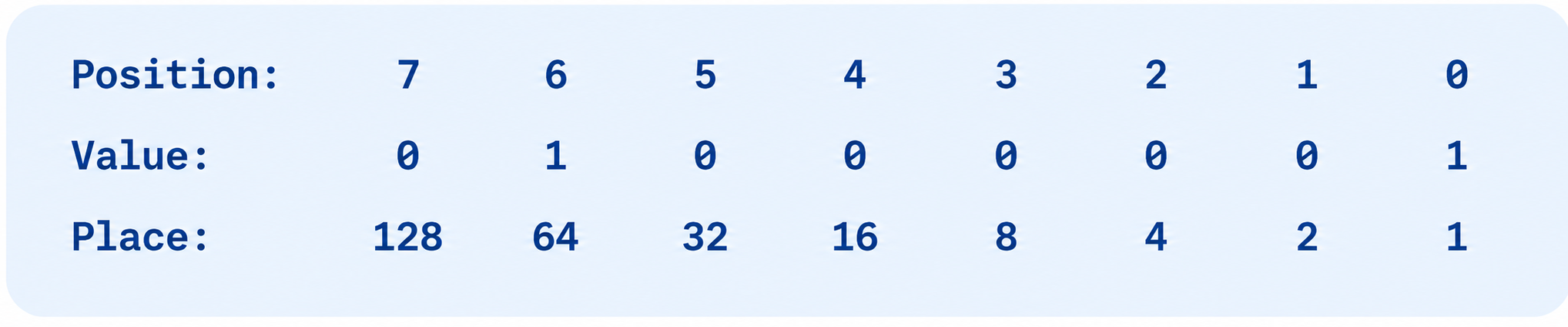
Calculating: (0×128) + (1×64) + (0×32) + (0×16) + (0×8) + (0×4) + (0×2) + (1×1) = 65
Example: Pixel Color
A simple 24-bit color image uses three bytes per pixel: one byte for red intensity, one for green, and one for blue. A pixel with byte values (255, 0, 0) appears pure red, while (0, 255, 0) appears pure green. Combining all three bytes produces over 16 million possible colors.
Critical Forensic Principle
All digital evidence is ultimately structured patterns of bits interpreted by systems. Whether examining a text message, a photograph, or a system log, the forensic analyst works with organized binary data. Understanding this foundation enables proper interpretation of evidence and prevents misattribution of meaning.
Binary and Number Representation
Computers operate using the base-2 number system, also known as binary. Humans typically use base-10 (decimal) because we have ten fingers, but computers use base-2 because electronic and magnetic systems naturally distinguish between two states.
Base-10 (Decimal) vs. Base-2 (Binary)
In decimal, each digit position represents a power of 10. The number 6,357 breaks down as:
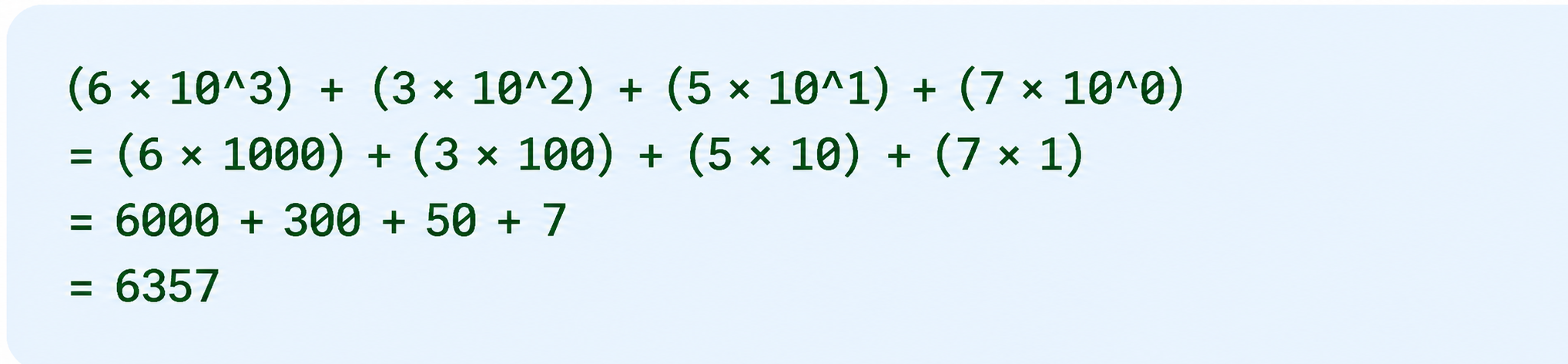
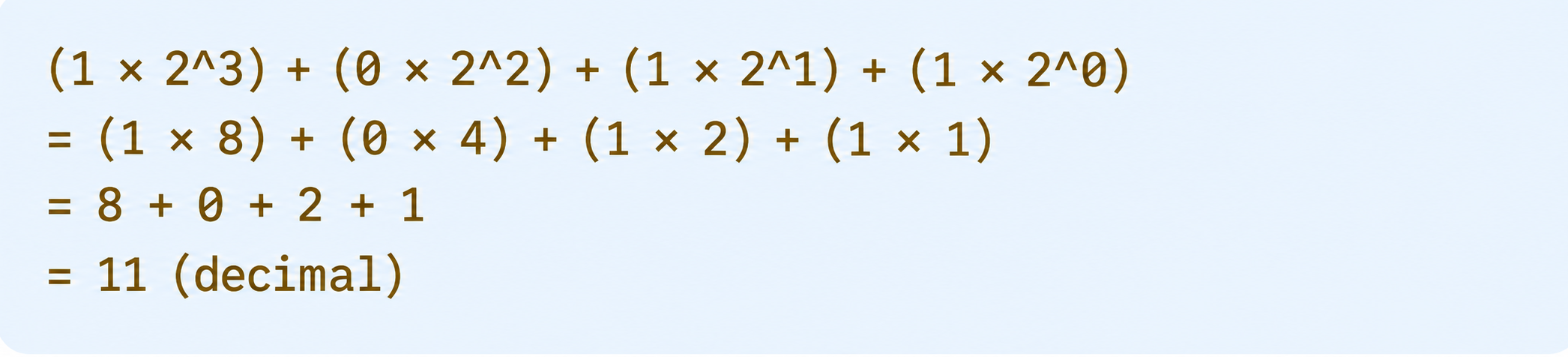
In binary, each bit position represents a power of 2. The binary number 1011 converts to decimal as:
Binary Counting Example
Counting from 0 to 8 demonstrates how binary addition works:
| Decimal | Binary |
|---|---|
| 0 | 00000000 |
| 1 | 00000001 |
| 2 | 00000010 |
| 3 | 00000011 |
| 4 | 00000100 |
| 5 | 00000101 |
| 6 | 00000110 |
| 7 | 00000111 |
| 8 | 00001000 |
Notice the pattern: when a bit is 1 and you add 1, it becomes 0 and the next bit becomes 1. This carrying mechanism operates exactly like decimal addition, just with a smaller base.
Pattern Growth
Each additional bit doubles the number of representable values:
- 1 bit: 2 patterns (0, 1)
- 2 bits: 4 patterns (00, 01, 10, 11)
- 3 bits: 8 patterns
- 4 bits: 16 patterns
- 5 bits: 32 patterns
- 6 bits: 64 patterns
- 7 bits: 128 patterns
- 8 bits (1 byte): 256 patterns
Mathematically, n bits yield 2^n possible patterns.
Hexadecimal: The Language of Forensic Analysis
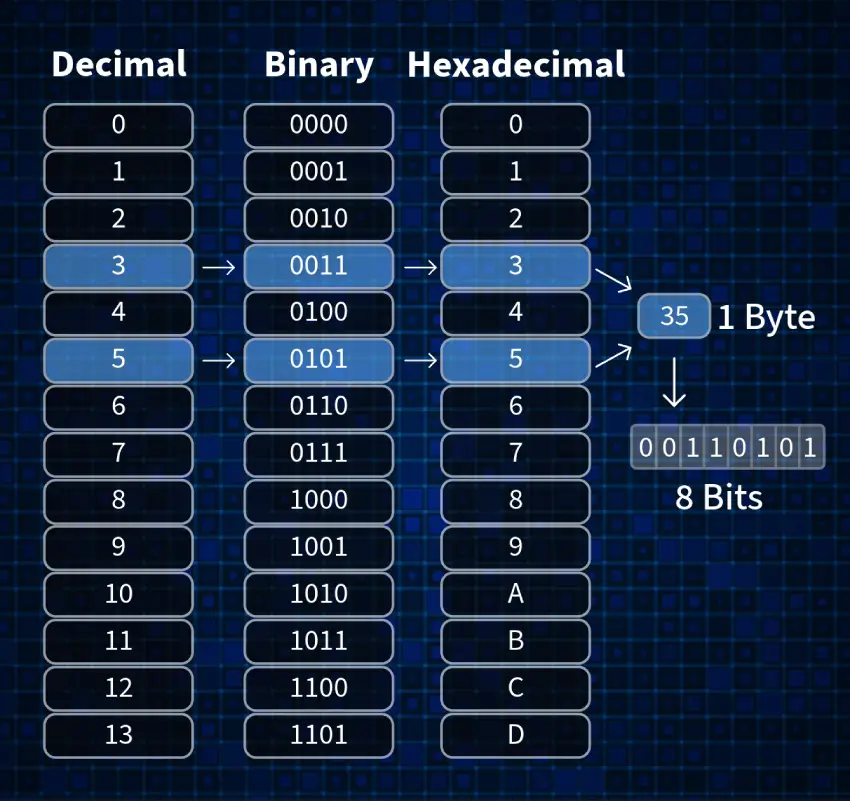
Hexadecimal (base-16) representation is the primary language of low-level digital forensics work. While binary shows the raw bits and decimal offers human familiarity, hexadecimal provides the compact, readable format that forensic analysts use daily.
Why Hexadecimal Is Essential
The majority of low-level forensic work occurs at the hexadecimal level for several reasons:
Compact Representation: One hexadecimal digit represents exactly 4 bits (one nibble). Two hex digits represent 8 bits (one byte). This means a 32-bit value requires only 8 hex digits instead of 32 binary digits.
Byte Alignment: Hexadecimal naturally aligns with byte boundaries. Since computers organize data in bytes, hex makes it easy to see where one byte ends and another begins.
Memory Addressing: Computer memory addresses display in hexadecimal. When examining disk sectors or memory dumps, locations appear as hex values like 0x1A3F or 0xFF00.
Hexadecimal Basics
Hexadecimal uses 16 digits:
- 0 through 9 (same as decimal)
- A through F (representing 10 through 15)
| Hex | Decimal | Binary |
|---|---|---|
| 0 | 0 | 0000 |
| 1 | 1 | 0001 |
| 2 | 2 | 0010 |
| 3 | 3 | 0011 |
| 4 | 4 | 0100 |
| 5 | 5 | 0101 |
| 6 | 6 | 0110 |
| 7 | 7 | 0111 |
| 8 | 8 | 1000 |
| 9 | 9 | 1001 |
| A | 10 | 1010 |
| B | 11 | 1011 |
| C | 12 | 1100 |
| D | 13 | 1101 |
| E | 14 | 1110 |
| F | 15 | 1111 |
Binary to Hex Conversion
Converting binary to hexadecimal follows a simple process:
- Group the binary digits into sets of 4 (starting from the right)
- Convert each 4-bit group to its hex equivalent
- Combine the hex digits
Example: Convert binary 10110011 to hexadecimal

Common Byte Values in Multiple Bases
| Decimal | Binary | Hex | ASCII | Description |
|---|---|---|---|---|
| 0 | 00000000 | 00 | NUL | Null character |
| 32 | 00100000 | 20 | Space | Space character |
| 48 | 00110000 | 30 | '0' | Digit zero |
| 65 | 01000001 | 41 | 'A' | Uppercase A |
| 97 | 01100001 | 61 | 'a' | Lowercase a |
| 127 | 01111111 | 7F | DEL | Delete character |
| 255 | 11111111 | FF | N/A | Maximum byte value |
Hexadecimal in Forensics
Forensic analysts encounter hexadecimal in multiple contexts:
- Memory Addresses: Locations in RAM or on disk display as hex (e.g., 0x7FFF5A)
- Disk Sector Numbers: Sector offsets on storage media use hex notation
- Hash Values: Cryptographic hashes (MD5, SHA-256) output as hexadecimal strings. An MD5 hash appears as 32 hex digits representing 16 bytes.
- File Signatures: File headers identifying file types use hex (e.g., JPEG starts with FF D8 FF E0)
- Hex Editor Views: Forensic tools display raw data in columns of hex values alongside their ASCII interpretations.
Encoding: Assigning Meaning to Bytes
Raw bytes have no inherent meaning. The same sequence of bits can represent a letter, a number, a pixel color, or an instruction, depending entirely on how a system interprets it. Encoding systems establish the rules for translating bytes into meaningful information.
Text Encoding Systems
ASCII (American Standard Code for Information Interchange)
ASCII was developed in the 1960s to standardize text representation. The original standard defined 128 characters using 7 bits (values 0-127). An extended version uses 8 bits (0-255).
Key ASCII values:
- 0-31: Control characters (non-printable)
- 32: Space
- 48-57: Digits '0' through '9'
- 65-90: Uppercase letters 'A' through 'Z'
- 97-122: Lowercase letters 'a' through 'z'
- 128-255: Extended characters (varies by implementation)
The uppercase letter "A" has ASCII value 65. In a text file, the letter A occupies one byte containing the binary pattern 01000001. The space character has value 32. A sentence like "CAT" occupies three bytes: 67, 65, 84. Forensic analysts reference the ASCII table when interpreting byte values as text.
Unicode
ASCII cannot represent characters from languages like Mandarin, Arabic, or Hindi. Unicode solves this by using multiple bytes per character. Common implementations include:
- UTF-8: Uses 1-4 bytes per character, backward compatible with ASCII
- UTF-16: Uses 2 or 4 bytes per character
- UTF-32: Uses 4 bytes for all characters
UTF-8 has become the dominant encoding for web content because it efficiently handles both ASCII characters (one byte) and extended characters (multiple bytes). The Unicode Consortium maintains the standard and provides resources for implementation.
Number Encoding
Integers
Small integers (0-255) fit in a single byte. Larger integers use multiple bytes:
- 2 bytes (16 bits): Range -32,768 to 32,767
- 4 bytes (32 bits): Range -2,147,483,648 to 2,147,483,647
- 8 bytes (64 bits): Range -9,223,372,036,854,775,808 to 9,223,372,036,854,775,807
Negative numbers typically use "two's complement" representation, where the leftmost bit indicates sign.
Floating-Point Numbers
Numbers with decimal fractions use IEEE 754 standard representation. A 32-bit float uses:
- 1 bit for sign
- 8 bits for exponent
- 23 bits for mantissa (significant digits)
This encoding can represent values like 3.14159 or 1.23 × 10^15.
The Interpretation Principle
Data has no inherent meaning without interpretation. A byte containing the value 65 could represent:
- The letter "A" (ASCII text)
- The number 65 (integer)
- Part of a larger number (one byte of a 4-byte integer)
- A color intensity (medium red in an image)
- Part of a machine instruction
- A status flag in a protocol header
Forensic analysis requires knowing the encoding scheme to interpret evidence correctly. Opening a binary file as text produces gibberish. Examining text as binary data obscures the content. The analyst must apply the correct interpretation lens.
Data Types and Logical Structure
Bytes group together to form higher-level data types. These structures build upon the raw binary foundation to represent complex information.
Characters
A character is the fundamental unit of text. In ASCII encoding, one character equals one byte. In Unicode (UTF-8), characters may occupy 1-4 bytes depending on the specific character.
Strings
Strings are sequences of characters. Computer systems store strings in several ways:
Null-Terminated Strings (C-style): Characters stored consecutively, ending with a null byte (value 0). The string "HELLO" occupies 6 bytes: H-E-L-L-O-NUL.
Length-Prefixed Strings: The first byte(s) indicate the string length, followed by the character data.
Fixed-Width Strings: Each string occupies a predetermined number of bytes, padded with spaces or nulls if the content is shorter.
Integers
Integer data types vary by size and signedness:
Unsigned Integers: Only positive values
- 8-bit: 0 to 255
- 16-bit: 0 to 65,535
- 32-bit: 0 to 4,294,967,295
Signed Integers: Positive and negative values using two's complement
- 8-bit: -128 to 127
- 16-bit: -32,768 to 32,767
- 32-bit: -2,147,483,648 to 2,147,483,647
Binary Data
Not all data represents text or numbers. Binary data includes:
- Image pixel values
- Audio samples
- Executable machine code
- Compressed archives
- Encrypted content
Binary data appears as raw byte sequences that require specific software to interpret.
Layered Structure
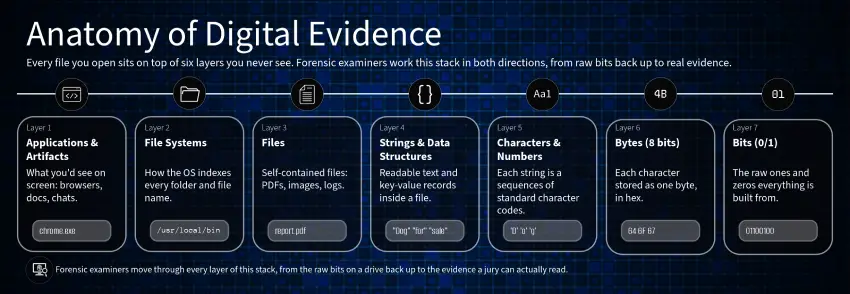
Digital data organizes in layers, each building on the one below:
Bits → Bytes → Characters/Numbers → Strings/Arrays →
Data Structures → Files → File Systems → Databases → Applications
At each layer, structure and meaning emerge from the layer beneath. A database file contains records, which contain fields, which contain strings, which contain characters, which are encoded bytes, which are bits on storage media.
Forensic tools operate at multiple layers simultaneously. A hex editor shows the raw byte layer. A database viewer shows the structured record layer. Understanding how these layers connect enables effective analysis.
Physical Storage of Bits
While forensic analysis typically works with logical data structures, understanding physical storage helps explain evidence characteristics and recovery possibilities.
Magnetic Storage (Hard Disk Drives)
Hard disk drives store data on spinning platters coated with magnetic material. The physical structure includes:
Platters: Circular disks rotating at high speed (5,400 to 15,000 RPM)
Read/Write Heads: Electromagnetic devices that detect and modify magnetic polarity on the platter surface
Tracks: Concentric circles on the platter surface where data is stored
Sectors: Divisions of tracks, typically 512 bytes or 4,096 bytes per sector
Data storage works by magnetizing small regions of the platter. Each region's magnetic orientation (North-South or South-North) represents a bit value. The read/write head detects these orientations as the platter spins beneath it.
Forensic Implications: Deleted data often remains on magnetic media until overwritten. Magnetic force microscopy can sometimes recover data even after overwriting, though this requires specialized equipment and clean room facilities.
Electrical Storage (SSDs and Flash Memory)
Solid-state storage uses electronic rather than magnetic principles:
NAND Flash Memory: Stores data in memory cells that trap electrical charge. Each cell holds one or more bits depending on the technology:
- SLC (Single-Level Cell): 1 bit per cell
- MLC (Multi-Level Cell): 2 bits per cell
- TLC (Triple-Level Cell): 3 bits per cell
- QLC (Quad-Level Cell): 4 bits per cell
Floating Gate Transistors: The charge storage mechanism uses transistors with an isolated "floating gate" that traps electrons. Charged cells read as one binary value; uncharged cells read as the other.
Wear Leveling: SSDs distribute write operations across all memory cells to prevent premature wear. This means logical file locations change physically over time.
TRIM Command: Operating systems use the TRIM command to inform SSDs which blocks are no longer needed. SSDs may then erase these blocks, making recovery more difficult than on magnetic media.
Comparison of Storage Technologies
| Characteristic | Hard Disk Drives | Solid-State Drives |
|---|---|---|
| Storage Method | Magnetic polarization | Electrical charge |
| Moving Parts | Yes (spinning platters) | No |
| Speed | Slower (mechanical delays) | Faster (electronic access) |
| Deleted Data Recovery | Often possible | More challenging |
| Physical Forensics | Magnetic microscopy possible | Limited physical analysis |
| Wear Pattern | Mechanical wear | Write cycle limitations |
Files: Organized Collections of Bytes
A file is a named collection of bytes with structure. While raw storage contains unstructured bit sequences, files organize bytes into meaningful, retrievable units.
File Headers and Magic Numbers
Files begin with distinctive byte sequences called headers or "magic numbers." These signatures identify the file type regardless of filename extension.
Common file signatures in hexadecimal:
| File Type | Header (Hex) | ASCII Representation |
|---|---|---|
| JPEG | FF D8 FF E0 | N/A (non-printable) |
| PNG | 89 50 4E 47 0D 0A 1A 0A | .PNG.... |
| GIF87a | 47 49 46 38 37 61 | GIF87a |
| GIF89a | 47 49 46 38 39 61 | GIF89a |
| 25 50 44 46 | ||
| ZIP | 50 4B 03 04 | PK.. |
| Windows EXE | 4D 5A | MZ |
The PNG signature contains a clever design: the first byte (0x89) is intentionally outside the standard ASCII range, ensuring that if the file is interpreted as text, it will not look like a text file. The subsequent bytes spell "PNG" in ASCII.
File Footers
Many file formats include ending signatures (footers) that mark file boundaries:
| File Type | Footer (Hex) |
|---|---|
| JPEG | FF D9 |
| PNG | 49 45 4E 44 AE 42 60 82 |
| GIF | 00 3B |
| 25 25 45 4F 46 |
Headers and footers work together to define file boundaries. Forensic carving tools search for these signatures in raw data to identify and extract files. For a comprehensive reference of file signatures, forensic analysts use Gary Kessler’s GCK File Signature Table, which catalogs known file signatures.
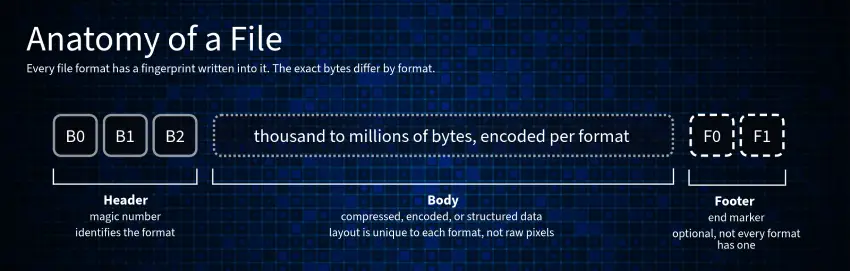
File Structure
Files typically follow a structure of header, body, and footer:
Header: Contains metadata about the file, including format version, dimensions (for images), or encoding parameters
Body: The primary content - pixel data for images, text for documents, samples for audio
Footer: Closing signature and sometimes additional metadata
How Systems Recognize File Types
Operating systems use multiple methods to identify files:
File Extensions: The suffix after the period (e.g., .jpg, .pdf) provides a hint but can be changed arbitrarily without affecting the actual file content.
File Header Detection: The operating system reads the first few bytes and compares them against known signatures. This method is reliable because it examines actual file content.
Content Analysis: Some systems examine file content beyond the header to confirm file type.
Forensic Relevance
File signatures enable critical forensic techniques:
File Carving: When file system metadata is missing or corrupted, forensic tools scan raw storage for known headers and footers to recover files.
Type Verification: Analyzing magic numbers confirms whether a file's content matches its extension. A file named "document.pdf" that starts with FF D8 FF E0 is actually a JPEG image.
Hidden Data Detection: Examining byte sequences can reveal files hidden within other files or embedded in unallocated space.
File Systems: Organizing Data at Scale
File systems provide the organizational layer between raw storage and user files. They manage how bytes are stored, retrieved, and tracked on storage media.
Purpose of File Systems
A file system serves several essential functions:
Organization: Grouping related files into directories and subdirectories
Indexing: Maintaining records of where each file's bytes are physically stored
Metadata Management: Tracking filenames, creation dates, modification times, access permissions, and file sizes
Space Allocation: Managing which storage sectors are in use and which are available
Without a file system, storage would be an unstructured stream of bytes with no way to locate specific information.
Directories and Folders
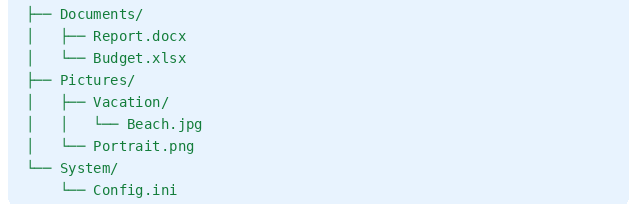
Directories (called folders in graphical interfaces) create hierarchical organization. A directory is itself a special file containing a list of filenames and pointers to their storage locations.
The directory structure forms a tree:
Allocation and Storage Concepts
Sectors: The smallest addressable unit on storage media, traditionally 512 bytes. Modern drives often use 4,096-byte sectors (Advanced Format).
Clusters (Allocation Units): Groups of sectors treated as a single allocation unit. A file occupying even one byte consumes an entire cluster. This reduces allocation tracking overhead but creates "slack space" (unused portions of clusters).
Fragmentation: When files are too large for contiguous clusters, they split across multiple locations. A fragmented file occupies cluster 100, cluster 250, cluster 105, and so on. The file system maintains a list of these locations.
Common File Systems
**NTFS (New Technology File System)**: Used by Windows. Features include:
- Master File Table (MFT) tracking all files
- Journaling for crash recovery
- Permissions and encryption support
- Alternate data streams (hidden data attachments)
FAT32 (File Allocation Table): Older Windows-compatible system:
- Simple structure with File Allocation Table
- Limited to 4GB maximum file size
- No journaling or permissions
- Used on USB drives for compatibility
ext4 (Fourth Extended File System): Common on Linux:
- Extents for efficient large file storage
- Journaling for reliability
- Supports very large files and volumes
APFS (Apple File System): Modern macOS and iOS:
- Copy-on-write for efficiency
- Snapshots for backups
- Native encryption support
Forensic Perspective
File systems present both opportunities and challenges for forensic analysis:
Deleted Files: When a file is deleted, most file systems remove the directory entry and mark the clusters as available. The actual byte data often remains until overwritten by new files.
Metadata Recovery: Timestamps, filenames, and directory structures may survive even when file contents are damaged.
Raw Sector Analysis: When file systems are corrupted, forensic analysts can bypass the file system entirely and examine raw sectors for evidence.
From Structure to Artifacts
Higher-level forensic artifacts emerge from structured data. Understanding how these artifacts form helps analysts locate, interpret, and present evidence.
Browser History
Web browsers store history as structured database files:
SQLite Databases: Most modern browsers use SQLite format with tables containing:
- URLs visited
- Page titles
- Visit timestamps (often in Unix epoch format)
- Visit counts
- Referrer information
The forensic analyst opens these database files, reads the table structures, and extracts the human-readable history. What appears as a chronological list in the browser interface is actually rows in a database, each row containing multiple data fields encoded as binary values.
System Logs
Operating systems and applications generate log files recording events:
Windows Event Logs: Binary format storing system events, application errors, security audits, and user actions
Syslog (Unix/Linux): Text-based logs with standardized format including timestamp, severity level, facility, and message
Application Logs: Custom formats specific to each application, may be text, binary, or database format
Logs provide timestamps and sequences of actions, crucial for establishing timelines in forensic investigations.
Application Data
Applications store user data in various structured formats:
Configuration Files: Settings and preferences, often in XML, JSON, or proprietary binary formats
Databases: Email clients, messaging apps, and productivity tools often use SQLite or proprietary database formats
Cache Files: Temporary copies of downloaded content, images, and web pages
Deleted Data Concepts
Logical vs. Physical Deletion:
- Logical deletion removes file system references (directory entries, allocation table entries)
- Physical deletion overwrites the actual byte data
Most standard deletions are logical only. The bytes remain on storage until the operating system reuses that space for new files.
Unallocated Space: Storage regions not currently assigned to active files. These areas may contain remnants of previously deleted files, fragments of partially overwritten files, or temporary data from application operations.
Slack Space: The unused portion of the last cluster allocated to a file. If a 100-byte file occupies a 4,096-byte cluster, 3,996 bytes of slack space exist at the end. This space may contain data from files previously stored in that cluster.
File Carving Overview
File carving extracts files from raw data without file system assistance:
The Process:
- Scan raw storage for known file signatures (headers)
- Identify corresponding footers where available
- Extract the byte sequence between header and footer
- Reconstruct the file using the extracted bytes
Carving Tools:
- Foremost: Open-source tool using configuration files defining signatures
- Scalpel: Optimized version of Foremost with performance improvements
- PhotoRec: Specialized for recovering image, video, and document files
- Bulk Extractor: High-speed tool extracting multiple data types
Carving succeeds when file system metadata is missing, corrupted, or intentionally destroyed.
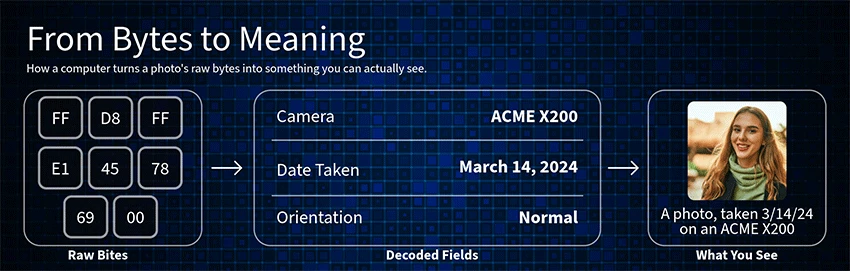
Interpretation Layers
Forensic analysis moves through layers of interpretation:
Raw Bytes → Hexadecimal View → Decoded Structures → Human-Readable Information
At the raw bytes layer, evidence appears as hexadecimal numbers. With decoding knowledge (file format specifications, database schemas), structures emerge. Finally, with proper interpretation, human-readable content becomes visible.
Conclusion – Everything Reduces to Bits and Bytes
All digital evidence is structured, interpreted data built from bits and bytes. From the smallest text file to massive enterprise databases, every piece of digital information shares this common foundation.
The bit is the atom of digital information. Everything else, structure and interpretation, builds upon that foundation. Bytes group bits into useful units. Encoding schemes give bytes meaning. Files organize bytes into named, structured collections. File systems manage files at scale. Applications present structured data through user interfaces.
This understanding forms the foundation for all digital forensic analysis. When an attorney asks how a deleted email was recovered, the answer involves understanding that deletion removed file system pointers, not the actual byte data. When an expert testifies about file timestamps, they are interpreting metadata stored as bytes in file system structures.
Forensic professionals who understand these layers can explain their methods clearly. Attorneys who grasp these concepts can ask more effective questions and better evaluate expert testimony. The result is a more reliable presentation of digital evidence in legal proceedings.
The technical foundation described in this guide supports every forensic examination. Whether analyzing a smartphone, a corporate server, or a single USB drive, the evidence ultimately consists of bits, bytes, and the structures built upon them. Understanding this anatomy of digital data is not merely academic; it is essential for retrieving the truth from digital evidence.

